

API and whitelist settings
If you want to send push notifications through the API (for example, for transactional messages triggered from your own system), you need to create an API key and whitelist your server’s IP.
Creating an API key
Section titled “Creating an API key”Go to Najva panel > Menu > Settings > Developers (پنل نجوا > منو > تنظیمات > توسعهدهندگان). This page has four tabs: api key, Webhook list (لیست وبهوکها), SMS templates (قالبهای پیامک) and Allowed IPs (IPهای مجاز).
In the api key tab, find the SMS and push notification api key (api key پیامک و پوشنوتیفیکیشن) section. If you have not created a key yet, you will see the message “You currently have no api key!” (شما در حال حاضر هیچ api key ندارید!); click Create new api key (ایجاد api key جدید).
For the exact structure of an API request (sample method, headers and body), see the Najva developer documentation; this section is being rewritten, and the final version will be published there.
Whitelisting an IP
Section titled “Whitelisting an IP”You do this yourself, directly from the panel; you do not need to submit a ticket:
- Go to Najva panel > Menu > Settings > Developers (پنل نجوا > منو > تنظیمات > توسعهدهندگان) and open the Allowed IPs (IPهای مجاز) tab.
- Click Add allowed IP (افزودن IP مجاز) and enter the IP from which push notifications will be sent. If needed, you can also add a description for it.
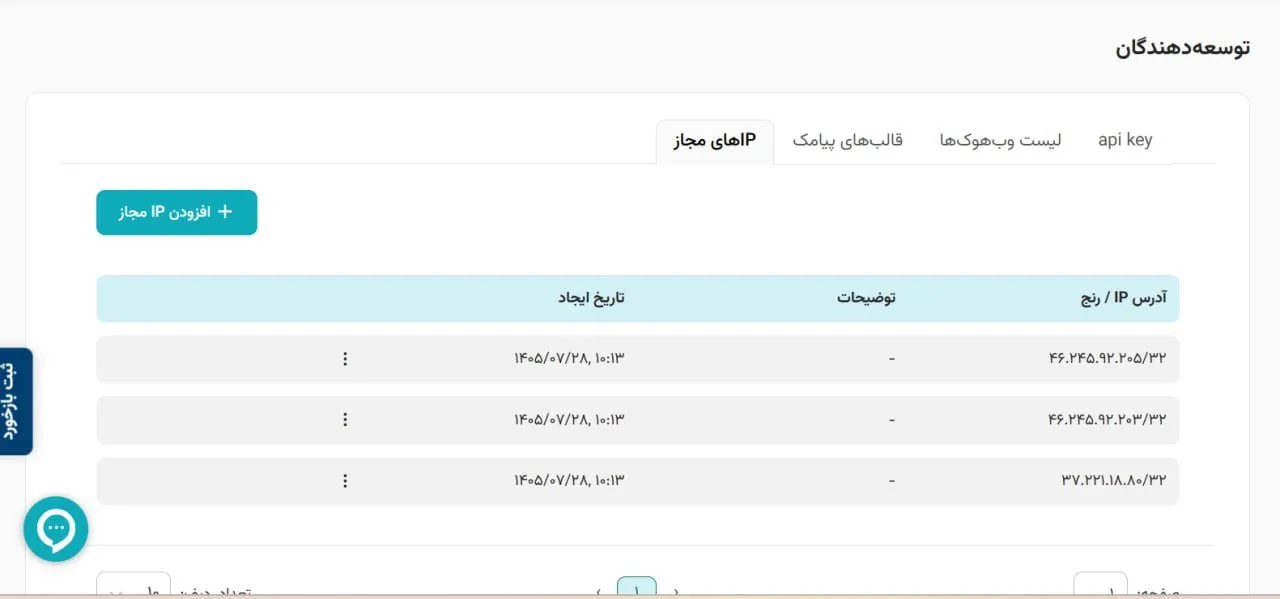
The registered IPs appear in this table, and you can manage each one with the three-dot menu (⋮) next to its row. Until your IP is in this list, sending push notifications through the API is not possible.
Webhook
Section titled “Webhook”In the Webhook list tab, you can define an address so that Najva notifies your system of events. Create a webhook with the Create new webhook (ایجاد وبهوک جدید) button; each webhook has a title, an address and a status (active or inactive), and can be edited or deleted later.
For more questions, see the push notification FAQ.
Next step
Section titled “Next step”To send push notifications through the panel, see Create and send a push campaign.